Phishing Email 20220427-001 - A Fake McAfee Invoice
I received another phishing email that managed to land directly in my inbox. However, in this case, around 20 minutes after it arrived it moved automatically into my spam folder. Good to know that Gmail will retroactively flag emails as spam after they’ve been delivered and yank them into oblivion.
Anyway. This particular email appeared to be an invoice from McAfee.
Primary Research
Details:
To: undisclosed-recipients
From: McAfee Support <jonathanroberts5181[@]gmail.com>
Subject: Thank you for your order #416U2YSA
BCC: [redacted]
A fun little detail the sender included in this whole scheme was to change the profile picture of their Gmail account to the McAfee logo. Since most mail clients will show the human-friendly name instead of the email address itself, this means that the email as it appeared in my inbox was the McAfee logo next to “McAfee Support” followed by the subject, giving it at least a superficial appearance of being a legitimate email.
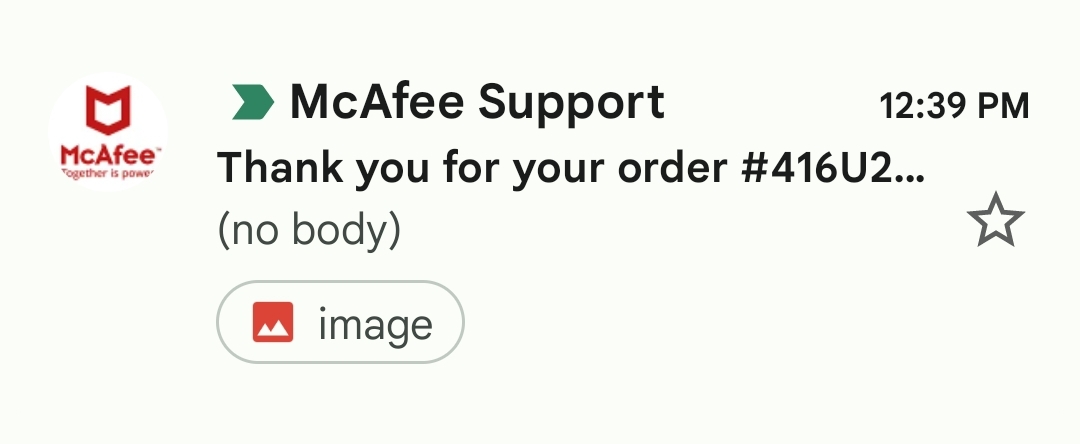
Looking at the sender’s email, the name Jonathan Roberts is common enough to not really lead to anything conclusive, and a search for the full email returned no results. This is probably another generated account designed to look innocuous enough to pass as a real human sending a legitimate email.
An immediate clue to this being a scam, though, is that my email is blind copied rather than being in the TO field, and the email appears to have been sent to multiple “undisclosed-recipients”. Why would more than one person receive an email with what I would assume should be a unique order number?
The email also contained an inline image, encoded into the email in Base64, simply named “image.jpeg”.
The body of the email contained a single, small snippet of HTML:
<div dir="ltr"><img src="cid:ii_l2hsv2pe0" alt="image.jpeg" width="-27" height="-21"></div>It’s a little obscure, but the src="cid:ii_l2hsv2pe0" part of the img tag is referencing the Content-ID of the embedded image.jpeg file in the email. When I viewed the email, the image failed to load, which could either be because the email was sitting in my spam folder or because of the negative values in the width and height parameters. Negative width and height values are invalid HTML. Browsers that adhere strictly to W3C standards will not render images with invalid values, while more permissive browsers will just ignore invalid values and render the image in the image’s default dimensions. This could potentially be an attempt to selectively target users with non-compliant browsers who would potentially be more vulnerable to a web-based attacks.
In any case, I was able to convert the embedded Base64 content into the original image, and got this:
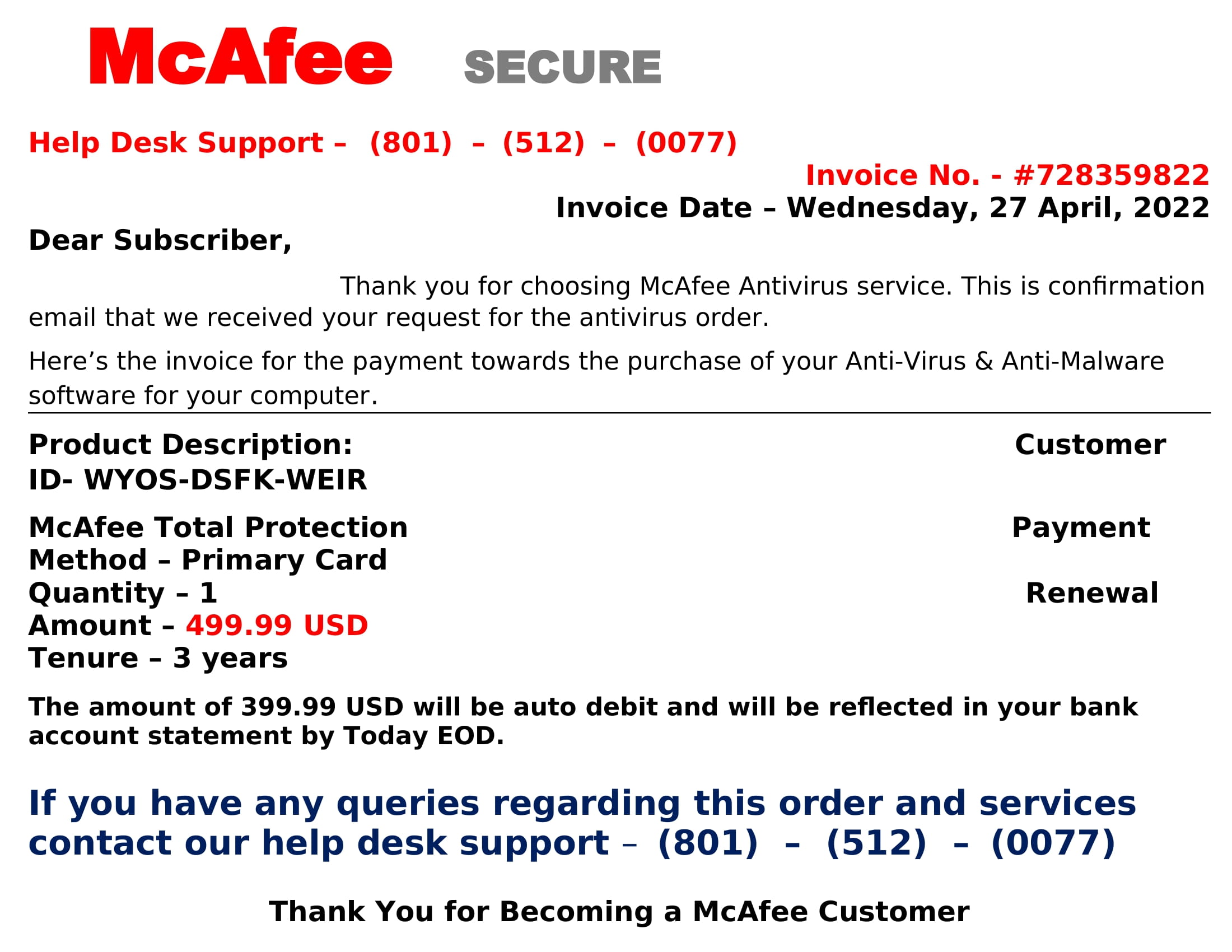
Oh my! I certainly didn’t order $500 worth of antivirus software, and certainly not from McAfee! I’ll need to call that support number immediately to sort this out! At least, that’s what I’m now sure the sender was hoping I would do. (Actually, I did call the phone number in the image from a burner phone app, but no one ever picked up. How’s that for customer service?)
There are some interesting bits of information available in this image. First, the invoice date in the image was the same as when I received the email, so my assumption is that the image was programmatically generated to contain information to create a sense of urgency in the targets. This could potentially cause a victim to not view the email critically and simply fire off a phone call to avoid a disasterous debit to their accounts.
Second, there are multiple inconsistencies within the invoice image that pretty much cement it as fraudulent:
- The form of payment is listed as “primary card,” but later in the invoice it says that the payment will be debited from my bank account
- There are two difference prices listed in the in voice: $499.99 in the itemized list and $399.99 further down the invoice
- Thanking me for “Becoming a McAfee Customer” when the type of transaction is listed as a Renewal
All of this, paired with the borderline broken English in the image and generic terms such as “Subscriber,” “Customer,” and “Primary Card” clearly mark this as a scam.
It makes me wish someone had answered when I called the number so I could get a little more insight into what they hoped to accomplish. I imagine it would be something along the lines of asking me to supply my credit card or banking information under the pretense of providing a refund and then using that information to rob me blind.
Given the glaring indicators in this email, I’m hopeful that most people who received it would see it for what it is and ignore it. Of course, the perpetrators only need a small percentage people to fall for it to make some money, given a wide enough net. It’s painful to think of people stealing money from well-meaning but slightly panicked victims, especially with something as low-effort as this.
A final note: The phone number in the fake invoice uses a Salt Lake City area code. I presume this is because that area code, 801, is near enough to toll free numbers to make it appear to be a more legitimate number for a corporate support line. It could be an easy mistake if you aren’t paying attention, so it’s worth noting that there are currently only 5 toll free area codes in the U.S. and Canada:
- 800
- 855
- 866
- 877
- 888
Primary Indicators
jonathanroberts5181[@]gmail.com
Hash
3bbf5f8e6a7d3aa3b298120d7a75e15f19d7c2e898e1a2d05b2b98c86675ba8a (sha256)